Tilt Shift Blur
Click, paste or drag and drop files to edit
Select an image file jpg, png, webp

Drag and drop
OR
How to use the tilt shift blur filter
Upload an image
Use the form above to load an image. Click the 'Upload image' button, copy and paste or drag and drop an image into the uploader.
Adjust
Adjust the controls in the tool settings bar to control how the tilt shift blur filter is applied.
Download or save
Export and download your edited image or save it to your account.
Learn More About
the Tilt Shift Blur Effect
On this page
1. About the Tilt Shift Blur Effect
The tilt shift blur effect allows you to add blur to specific areas of your image, typically above and below a central axis, creating a miniature effect or emphasizing certain parts of the image. Upload an image from your computer and apply the tilt shift blur effect as needed.
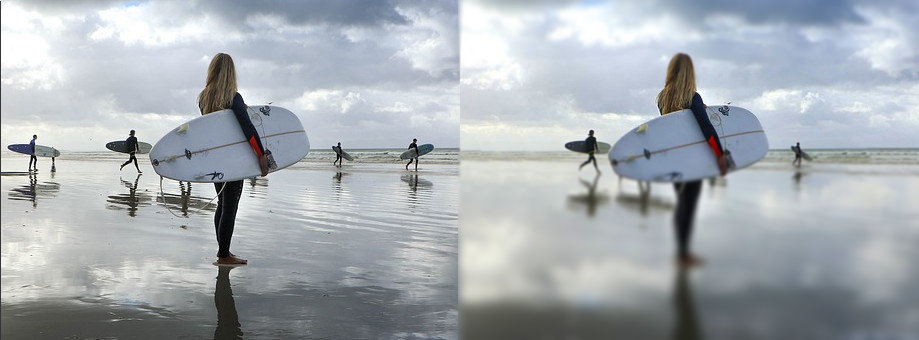
2. How the Tilt Shift Blur Effect Works
The tilt shift blur effect works by applying blur above and below a central axis in your image. The area along the axis remains in focus while the regions above and below are blurred, creating a depth-of-field effect. Adjusting the position of the axis changes which parts of the image are blurred and which remain sharp.
